
Top 12 Best Electric Computer Duster to Turbocharge Cleaning!
Dust buildup inside a computer can cause overheating and random shutdowns, problems familiar to anyone who’s ever relied on a best electric computer duster. Cheap or poorly designed dusters often deliver weak airflow or, worse, blow dust deeper into tight areas.
Some models are noisy or difficult to maneuver around delicate components, which can lead to frustration and ineffective cleaning.
The most important factors in a good electric computer duster include a strong, consistent airflow measured in liters per minute, typically above 30 L/min, to dislodge dust without damaging parts. Compact size and lightweight construction make it easier to reach small spaces inside cases. Safety also matters; well-made models avoid producing static electricity, while ones with washable filters help maintain performance over time.
Need a Quick Check?
| Image | Product | Price |
|---|---|---|
Our Top Picks 1  | WOLFBOX MF60 Duster | Check Price |
Our Top Picks 2  | WOLFBOX MegaFlow 50 | Check Price |
Our Top Picks 3  | Generic Electric Air Duster | Check Price |
Our Selected Top 12 Electric Computer Duster Picks for Every Need
This list features a variety of electric computer dusters designed to keep your devices clean and dust-free. Each review covers how well the duster performs, who it is best suited for, and highlights its strengths and weaknesses. This will help you choose the right one for your needs.
1. WOLFBOX MF60 Compressed Air Duster
Strong power and versatility make this electric duster a solid choice for anyone needing a thorough clean on sensitive electronics. Music fans, gamers, or everyday computer users will appreciate the three speed options tailored to different dusting needs, with the highest setting blasting away the toughest debris quickly.
Setup involves charging two 2500mAh batteries, which takes about 3.5 hours for a full charge. Once ready, switching between three speeds is straightforward: low for delicate parts, medium for regular cleaning, and high for stubborn dirt.
Its lightweight design, at only 0.5 lbs, makes it easy to maneuver around keyboards, cases, and fans without tiring your hand.
The air duster delivers impressive power, reaching up to 110,000 RPM on the highest setting, effectively removing dust and crumbs. The build feels compact and sturdy, making it convenient for repeated use. Common praise highlights long battery life and strong blasts, while one downside is the limited runtime on the top speed before needing a recharge.
The strongest praise notes its long battery life and powerful air blasts that remove tiny dust particles effectively. The most common complaint is shorter runtime when using the highest speed, which means repeated charging might be necessary for extended deep cleaning sessions.
People who need a lightweight, adjustable power duster for regular PC maintenance will find this a good fit. Those requiring longer continuous use on high power may want to explore other options with bigger batteries or faster recharge times.
Pros
- Powerful 110,000 RPM burst for tough debris
- Lightweight and easy to handle
- Long battery life on lower speeds
- Three speed settings for various cleaning needs
Cons
- Limited runtime at highest speed setting
- Requires charging before use
| Specification | Details |
|---|---|
| Brand Name | WOLFBOX |
| Model Number | MegaFlow 60 |
| Speed Settings | 3 (25K, 60K, 110K RPM) |
| Battery Capacity | 2 x 2500mAh |
| Weight | 0.5 lbs |
| Charge Time | 3.5 hours |
2. WOLFBOX MegaFlow 50 Compressed Air Duster
Dust often settles in hard-to-reach spots on a computer, and keeping it clean is crucial to avoid overheating. The WOLFBOX MegaFlow 50 electric air duster is designed for tech enthusiasts who need a reliable, powerful tool that tackles dust without the waste of canned air. Its main strength lies in its high-speed turbo fan that blasts away debris quickly.
Setup takes just seconds, insert the included lithium-ion battery, choose from three adjustable speed settings, and start cleaning. It feels light at only 0.45 lb, making it easy to handle in tight spaces or on keyboards.
The compact size and lanyard allow comfortable use indoors and outdoors. Different nozzles let you focus airflow precisely where it’s needed.
Performance meets expectations with air speeds up to 110,000 RPM, efficiently removing dust and dirt from computer components. The durable build is suited to long-term use and offers a sustainable option compared to disposable cans. Users praise its power and battery life.
The most common downside mentioned is that it may not reach some extremely tight or angled crevices without repositioning the nozzles.
The strongest praise highlights the turbo fan’s power and the rechargeable battery’s longevity, making it a cost-effective alternative to canned air. The most frequent complaint notes difficulty reaching some narrow angles without moving the nozzles around.
Those who want a portable, environmentally friendlier duster with solid cleaning power will appreciate this model. Users requiring deep cleans in very tight or awkward spaces should consider a different tool with more nozzle flexibility.
Pros
- Compact and lightweight design
- Powerful turbo fan with three speeds
- Includes four nozzles for versatile cleaning
- Long-lasting rechargeable lithium-ion battery
Cons
- May need nozzle adjustment for tight spaces
- Single unit only, no extra batteries included
| Specification | Details |
|---|---|
| Speed Settings | 3 Adjustable |
| Maximum Speed | 110,000 RPM |
| Weight | 0.45 lb |
| Included Components | 1 Lithium Ion Battery, 4 Nozzles |
| Warranty | 24 Months Manufacturer |
3. Electric Compressed Air Duster
Blasting air at 52 m/s, this electric duster is perfect for anyone tired of canned air and looking for a more powerful, reusable solution. Its key strength lies in a brushless motor that spins up to 130,000 RPM, making it speedy and effective on stubborn dust in electronics.
Setting up takes just a quick charge, then you can adjust the airflow across four speed levels using simple buttons. Lower settings handle delicate dusting on keyboards, while the highest gears clear away heavier debris. The storm mode activates with a long press, delivering an intense blast when needed.
Being rechargeable means no more fuss with refills or waste.
It performs well at blowing out deeply settled dust with steady, controlled airflow. The build feels solid and practical for regular use, though some users mention the highest speed can be a bit loud.
The electric motor stands out for delivering consistent power without wet or harsher chemicals, but the button controls might feel a little tricky to get used to at first.
The strongest praise focuses on the powerful airflow quickly clearing years-old dust, making deep cleaning fast and effective. The most common complaint points to noise levels at top power and some difficulty with the control buttons during initial use.
People wanting a long-term, reusable duster that adapts across cleaning needs will appreciate this. Those needing a quieter tool or very simple controls might prefer a different option.
Pros
- Powerful 130,000 RPM brushless motor
- Four adjustable wind speeds for precise cleaning
- Rechargeable and eco-friendly alternative to canned air
- Storm mode for heavy-duty dust removal
Cons
- Highest speed setting can be noisy
- Button controls take some getting used to
| Specification | Details |
|---|---|
| Manufacturer | ZOAIVR |
| Number of Items | 1 |
| Motor Speed | 130K RPM |
| Airflow Velocity | 52 m/s |
| Wind Speed Settings | 4 Gears with Storm Mode |
| Warranty | 1 Year |
4. Electric Rechargeable Compressed Air Duster

Anyone looking for a lightweight yet powerful tool to keep their computer free of dust will appreciate this electric air duster. It suits people who want a cordless option that balances strong airflow with easy handling.
The most notable feature is its impressive air speed that tackles dust in tight spaces quickly.
Setup involves charging the built-in battery, which then delivers up to 4 hours of continuous use on the lowest setting. Operating it day-to-day is straightforward, with three speeds available for different dusting needs: two continuous options at 25,000 and 60,000 RPM, plus a boost mode that ramps the power to 110,000 RPM while the button is held. The lightweight design helps avoid arm strain during longer cleaning sessions.
Performance-wise, the duster effectively blasts away dust with a powerful airflow reaching speeds of 72.4 m/s, making it suitable for delicate electronics. The brushless motor adds durability, and the handheld unit weighs only 0.45 pounds, making it very portable.
The most praised aspect is strong yet controlled airflow, while the common complaint mentions that the highest power mode requires holding down a button continuously, which can be tiring.
The strongest praise highlights the duster’s powerful and controlled airflow that easily clears dust from delicate equipment without shaking or damaging components. The most frequent complaint focuses on the power mode, which needs continuous button pressing to maintain maximum airflow, causing hand fatigue during longer use.
Those who want a compact and portable electric duster with adjustable speeds will be satisfied by this model. Users needing a truly hands-free high-power mode for extended periods might consider alternatives better suited for nonstop heavy-duty dusting sessions.
Pros
- Lightweight design at only 0.45 pounds
- Three speed options for versatile cleaning
- Up to 4 hours of runtime on low speed
- Strong air speed reaching 72.4 m/s
Cons
- Power mode requires holding button continuously
- Highest power only active while button is pressed
| Specification | Details |
|---|---|
| Brand Name | Besrun |
| Model Number | X113 |
| Weight | 0.45 lb |
| Max Air Speed | 72.4 m/s |
| Battery Runtime | Up to 4 hours on low |
| Peak Power | 120W |
5. Cordless Brushless Compressed Air Duster

Cordless Brushless Compressed Air Duster works well for anyone needing a strong, portable cleaning tool for electronics and around the house. Its biggest strength comes from a turbo fan that spins up to 130000RPM, making it powerful enough to clear out dust without the mess of canned air.
Setup is simple with a USB-C fast charging cable included, taking about 3 hours for a full charge. Using the duster daily is flexible thanks to three adjustable speeds, the lowest setting lasts up to 240 minutes, while the highest is good for 25 minutes.
Various nozzles come attached, so changing them lets you clean tight spaces like keyboard keys, car vents, and pet areas easily.
Performance matches its promise of a powerful clean, making quick work of dust and debris. The build feels durable, holding up well over multiple uses.
Most reviews praise how long the battery lasts on low speed, though some users mention the shorter runtime on the highest speed as a limitation. The LED light adds useful visibility when cleaning dark spots.
Many users highlight the long battery life on the lowest setting as a major advantage, allowing extended cleaning without interruptions. The main complaint centers on the relatively short 25-minute runtime when running at the highest speed, which might not cover longer or multiple jobs.
People who prioritize long, gentle cleaning sessions and appreciate adjustable speed options will find this duster handy. Those requiring continuous heavy-duty use might want to consider a model with longer high-speed battery life or a mains-powered option.
Pros
- Powerful turbo fan reaching 130000 RPM
- Long battery life on the lowest speed
- Includes five different nozzles
- LED light helps clean dark spaces
Cons
- Shorter use time at the highest speed (25 minutes)
- May need frequent recharging if using top speed often
| Specification | Details |
|---|---|
| Power Source | Battery Powered |
| Voltage | 5 volts |
| Form Factor | Handheld |
| Rechargeable | Yes |
| Charging Time | 3 hours |
| Maximum Speed | 130000 RPM |
6. WOLFBOX MF100 Compressed Air Duster

WOLFBOX MF100 Compressed Air Duster stands out for its powerful turbo fan ideal for clearing dust from electronics and various surfaces. It suits anyone looking for a versatile and strong electric duster with adjustable speeds to handle delicate keyboards or larger outdoor cleaning tasks.
Setting up involves charging the duster via USB, which is straightforward and convenient. The three speed settings make daily use flexible, allowing you to dial in just the right amount of airflow without struggling over delicates. The inclusion of multiple nozzles and brushes means switching between computer parts and other chores feels natural and keeps the process smooth.
Cleaning performance is impressive, reaching speeds up to 150,000 RPM and a wind speed capable of shifting stubborn dust easily. The build feels solid and well-made for lasting use.
Most users appreciate its strong airflow and quick adaptability, though a few find the highest speed a bit loud and less controlled in tight spaces.
Strong airflow and flexible speed settings are frequently praised for handling electronics and general cleaning well. A common complaint is the noise level when running at maximum speed, which can be a distraction in quiet environments.
People who need a powerful and adaptable duster for everything from PC keyboards to outdoor uses will enjoy this model. Anyone needing extremely low noise or pinpoint accuracy on small parts should consider quieter or more specialized alternatives.
Pros
- Adjustable speeds for different tasks
- Multiple nozzles and brushes included
- Strong airflow with 150,000 RPM fan
- Easy USB charging
Cons
- Highest speed can be noisy
- Less precise airflow in tight spaces
| Specification | Details |
|---|---|
| Model Number | MegaFlow100 |
| Max Wind Speed | 79 m/s |
| Speed Settings | 3 |
| Included Components | Brushes, USB Cable |
| Manufacturer Part Number | MF100 |
| Warranty | 24 Months Manufacturer |
7. FRESMOL Compressed Air Duster

Feels much easier to handle than traditional compressed air cans, especially without worrying about running out of propellant mid-clean. Great for anyone who needs regular dusting of keyboards, PC towers, or car interiors.
The standout feature is the 100000RPM motor combined with adjustable speeds, making it versatile for various cleaning tasks.
Setting it up is straightforward since it is rechargeable and cordless, meaning no fumbling with disposable cans or cords during use. The smart LED display shows battery level and speed mode at a glance, helping adjust airflow from gentle to strong depending on the job.
The included five nozzles and three brushes cover tight corners and keyboard gaps very well, making daily touch-ups quick and precise.
Performance-wise, it cleans dust efficiently on all sorts of devices thanks to the powerful motor and variable speed options. The build feels solid and comfortable to hold, with attachments that truly make a difference in reaching tricky spots. Most praise highlights its strong airflow and reusable convenience, while common complaints center on battery life not lasting very long during extended sessions.
Strong airflow at up to 100000RPM makes cleaning efficient, and the reusable nature saves money and waste compared to disposable cans. Battery life remains the main drawback for those who need extended running time without recharge. The intelligent display helps manage both airflow and power consumption well.
Ideal for anyone wanting a reliable, cordless duster with flexible attachments for detailed work. Less suited to users who need very long continuous operation or the lightest possible tool for handheld use. A good choice for PC or car cleaning routines where portability and power balance matter most.
Pros
- Rechargeable and cordless design
- Smart LED display for speed and battery
- Multiple nozzles and brushes included
- Three speed levels for different dusting tasks
Cons
- Battery life can be short during long cleaning
- Not as lightweight as some other dusters
| Specification | Details |
|---|---|
| Motor Speed | 100000RPM |
| Speed Settings | 3 Adjustable Speeds |
| Included Accessories | 5 Nozzles & 3 Brushes |
| Model Number | VC018 |
| Warranty | 1 Year Manufacturer |
8. GOOLOO F3 Compressed Air Duster
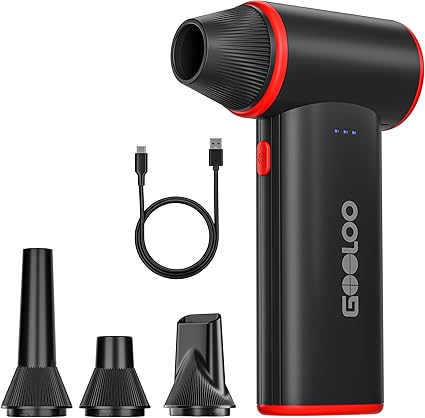
Powerful and precise, the GOOLOO F3 Compressed Air Duster suits anyone needing a reliable way to clean electronics, cars, or small home appliances. Its strongest feature is the impressive 150,000 RPM high-pressure wind power that tackles stubborn dust and debris effectively.
Setting it up requires no complicated steps, just hold the handheld blower and direct the airflow where you need it. It replaces traditional dusters like brooms and cloths by delivering a strong blast that reaches tight spots in keyboards, car interiors, and even outdoor gear.
Its portability makes switching from one cleaning task to another quick and easy.
It excels in pushing away dust and dirt with consistent power, making PC and electronics cleaning straightforward. The build feels sturdy enough for repeated use, and its design works well for detailed dust removal. Most praise revolves around its strong air output, while some note it could be loud during prolonged use.
The high-pressure airflow makes dust removal thorough even in hard-to-reach spots, though the noise level is noticeable during longer cleaning sessions. The blower’s strength stands out as its main benefit in practical use.
Those seeking a powerful tool for multiple cleaning tasks will appreciate its performance, but people sensitive to noise or wanting a quieter device might want to consider alternatives.
Pros
- Strong 150,000 RPM high-pressure wind power
- Multi-scenario use for PCs, cars, home, outdoors
- Replaces less effective traditional dusting methods
- Portable, handheld design for easy cleaning
Cons
- Can be loud during extended use
- No detailed power consumption specs available
| Specification | Details |
|---|---|
| Manufacturer | GOOLOO |
| Model Number | F3 |
| Manufacturer Part Number | X201 |
| Warranty Description | 18 Months |
9. WOLFBOX MF200 Compressed Air Duster
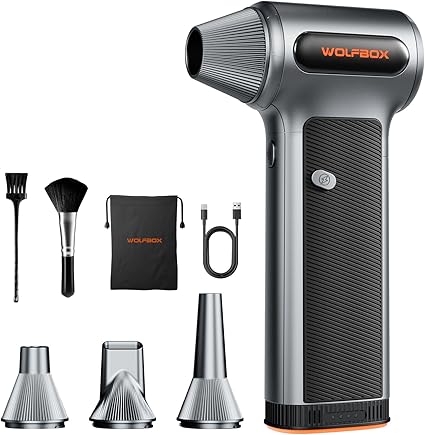
Plastic build with a removable battery system makes this a solid choice for anyone needing nonstop computer cleaning. Greatest strength lies in the swappable 22.2Wh battery, allowing continuous operation without waiting for a recharge.
Setup involves charging either the battery or the tool itself via Type-C, which takes about 2.5 hours for a full charge. Switching batteries mid-clean is straightforward, keeping the duster running for up to 100 minutes on its lowest speed. Backup batteries must be bought separately if you want true non-stop use.
Powered by a brushless motor pushing air speeds up to 87.5 m/s, it handles dust removal instantly. The build feels durable enough for regular use, while the main complaint is about needing to buy extra batteries to avoid downtime. It performs well for extended cleaning sessions.
The most praised feature is the removable battery design that allows continuous use without interruption. The common downside is the need to purchase backup batteries separately for true nonstop operation. Charging takes about 2.5 hours, which some may find slow for heavy use.
Someone needing long cleaning sessions will appreciate this duster’s battery flexibility and powerful airflow. Those wanting a single-battery solution or faster recharge might look elsewhere to avoid buying extras or downtime during charging.
Pros
- Swappable battery for uninterrupted cleaning
- Type-C charging supports fast recharging
- Long runtime at low speed
- Strong airflow removes dust quickly
Cons
- Extra batteries sold separately
- Highest speed reduces battery life
| Specification | Details |
|---|---|
| Model Number | MF200/PROMAX |
| Battery Capacity | 22.2Wh total |
| Charging Method | Type-C (2.5 hours full charge) |
| Operation Time | Up to 100 minutes at lowest speed |
| Airflow Speed | Up to 87.5 m/s |
| Warranty | 24 months |
10. AirTec Ultra Electric Air Duster

Powerful air output is what stands out with the AirTec Ultra Electric Air Duster, suited for anyone needing precise dust removal from sensitive electronics. Its strength lies in providing a strong, continuous jet of air that tackles stubborn dust with ease, making it ideal for cleaning PCs, gaming consoles, and household appliances.
Plugging it in is straightforward, and with six interchangeable nozzles, daily cleaning becomes more adaptable. Smaller nozzles let you target tight spots, while larger ones cover broader surfaces quickly.
It runs on a 350w motor, which keeps energy use low without sacrificing the airflow needed for regular tech cleaning tasks.
The motor delivers a consistent stream of air that clears dust efficiently from complex device parts and appliances. It’s built solidly, but some users mention the nozzle attachments could be a bit tricky to swap. The strongest compliments focus on its powerful airflow and energy efficiency, while the most common criticism points to the nozzle fit and switching experience.
The duster stands out for sustaining a strong airflow while using minimal power, making it practical for frequent use. Users appreciate the versatility of six nozzle options but often remark that switching nozzles can be a bit cumbersome. These points shape how daily cleaning feels with the device.
People needing precise cleaning for delicate electronics and energy-conscious operation will find it suitable. Those who want quicker nozzle changes or multiple tools in one pack might want to explore alternatives that address these specific areas.
Pros
- Continuous strong air jet for effective cleaning
- Six interchangeable nozzles for varied tasks
- Energy efficient 350w motor
- Works on delicate tech and home appliances
Cons
- Nozzle attachments can be hard to change
- Single device in pack, no extras included
| Specification | Details |
|---|---|
| Brand Name | IT Dusters |
| Model Number | Type 3 – Type 3 |
| Number of Items | 1 |
| Unit Count | 1 Count |
| Motor Power | 350w |
| Warranty Description | 1 Year |
11. Fanttik B10 Pro Max Electric Air Duster
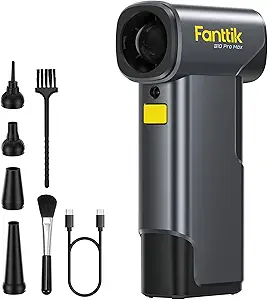
Powerful cordless air dusters that can switch from gentle to intense cleaning stand out when dealing with sensitive tech gear. Designed for people who want a reliable tool for everything from keyboards to workbenches, the Fanttik B10 Pro Max offers a high-speed 130000 RPM motor that handles dust effectively.
Getting started is straightforward since it runs on built-in lithium batteries charged via Type-C, so you don’t have to deal with cords. Charging once gives you plenty of cleaning time with up to 210 minutes on a full battery.
Switching between six speed levels lets you tailor the airflow, and the MegaBoost button delivers an extra burst for stubborn dust or dirt.
It cleans thoroughly thanks to a strong airflow speed of up to 65 meters per second, making quick work of dust buildup. The sturdy build feels solid in hand, and the brushless motor is quiet but powerful.
Most users appreciate how long the battery lasts and the convenience of cordless use, though some mention the weight can become noticeable during longer sessions.
The most praised feature is the long runtime combined with variable speeds, letting you clean everything from delicate gadgets to tough debris. The common complaint revolves around the weight, which can feel tiring if used for extended periods.
People needing a flexible, cordless duster for regular tech cleaning will find this model useful. Those wanting an ultra-light option for quick, small jobs might prefer a simpler tool.
Pros
- Six adjustable speed levels for different cleaning needs
- Long runtime of 210 minutes per charge
- MegaBoost button delivers a powerful airflow burst
- Doubles as a backup power bank
Cons
- Heavier than lighter handheld dusters
- Battery life may vary with highest speed use
| Specification | Details |
|---|---|
| Model Number | B10 Pro Max |
| Motor Speed | 130000 RPM brushless motor |
| Airflow Speed | Up to 65 m/s |
| Battery Capacity | 2x 4000 mAh lithium batteries |
| Runtime | Up to 210 minutes per charge |
| Charging Port | Type-C |
12. METROVAC DataVac ED500 Electric Air Duster

Dust buildup on keyboards, vents, and tight spots can be really annoying and tough to clean properly. Designed for anyone who wants a reliable electric duster, this model shines with its strong airflow to blast away dust and debris quickly.
Plugging in the device is straightforward with no complicated setup involved. Its motor kicks in immediately, providing a steady and powerful stream of air.
Using it on electronics or around the house feels simple, and it can reach areas like vents and under furniture easily. It doesn’t require you to buy replacement cans, making it a more practical choice for ongoing maintenance.
The airflow strength really gets into crevices, clearing stubborn dust and pet hair effectively. Built solidly by METROVAC, the unit feels durable enough for regular use. Positive notes highlight its power and versatility, while a frequent downside is that it can be a bit noisy during operation.
Strong airflow effectively cleans stubborn dust and hair, but the noise level can be distracting during use. The device is praised for performing well across various surfaces and locations. A common complaint is the sound it makes while running.
This electric duster suits anyone needing a reusable, powerful tool to keep electronics and home areas dust-free. Those seeking a quieter option might look elsewhere for lighter noise during operation.
Pros
- Powerful airflow clears dust and pet hair easily
- Works on electronics and many household surfaces
- Does not rely on single-use air cans
- Sturdy construction for lasting use
Cons
- Can be noisy during operation
- Only one unit included per purchase
| Specification | Details |
|---|---|
| Brand Name | METROVAC |
| Model Number | ED-500 |
| Manufacturer Part Number | FBA_ED-500STR-Wht |
| Number of Items | 1 |
| Unit Count | 1 Count |
Best Electric Computer Dusters Comparison Table
| Product | Brand | Battery | Included Components | Warranty |
|---|---|---|---|---|
| WOLFBOX MF60 Duster | WOLFBOX | No | – | 24 Months |
| WOLFBOX MegaFlow 50 | WOLFBOX | Lithium Ion Battery | 4 Nozzles | 24 Months |
| Generic Electric Air Duster | ZOAIVR | No | – | 1 Year |
| Rechargeable Electric Duster | Besrun | Rechargeable | – | – |
| Cordless Brushless Duster | – | Rechargeable | – | – |
| WOLFBOX MF100 Duster | WOLFBOX | No | Brushes, USB Cable | 24 Months |
| FRESMOL Air Duster | FRESMOL | No | Instruction manual | 1 Year |
| GOOLOO F3 Duster | GOOLOO | No | – | 18 Months |
| WOLFBOX MF200 Duster | WOLFBOX | No | – | 24 Months |
| AirTec Ultra Duster | IT Dusters | No | – | 1 Year |
| Fanttik B10 Pro Max | Fanttik | No | – | – |
| METROVAC DataVac ED500 | METROVAC | No | – | – |
- BrandWOLFBOX
- BatteryNo
- Included Components–
- Warranty24 Months
- BrandWOLFBOX
- BatteryLithium Ion Battery
- Included Components4 Nozzles
- Warranty24 Months
- BrandZOAIVR
- BatteryNo
- Included Components–
- Warranty1 Year
- BrandBesrun
- BatteryRechargeable
- Included Components–
- Warranty–
- Brand–
- BatteryRechargeable
- Included Components–
- Warranty–
- BrandWOLFBOX
- BatteryNo
- Included ComponentsBrushes, USB Cable
- Warranty24 Months
- BrandFRESMOL
- BatteryNo
- Included ComponentsInstruction manual
- Warranty1 Year
- BrandGOOLOO
- BatteryNo
- Included Components–
- Warranty18 Months
- BrandWOLFBOX
- BatteryNo
- Included Components–
- Warranty24 Months
- BrandIT Dusters
- BatteryNo
- Included Components–
- Warranty1 Year
- BrandFanttik
- BatteryNo
- Included Components–
- Warranty–
- BrandMETROVAC
- BatteryNo
- Included Components–
- Warranty–
How to Choose the Best Electric Computer Duster
Choosing an effective electric computer duster depends on airflow strength, noise level, and ease of use, ensuring thorough cleaning without damaging components. Prioritizing these factors helps avoid repeated purchases and prevents potential harm to sensitive electronics, saving time and money in the long run.
Airflow Power and Pressure
Cleaning a computer with weak airflow often means dust stays trapped in tight spots, making the effort pointless. Devices with strong and consistent airflow are key tools when clearing out dust from fans and heat sinks. Look for models providing adjustable pressure settings, which help prevent damage to delicate circuits while still blasting away debris effectively.
A good blower can deliver around 7-10 PSI of pressure, enough for stubborn dust without causing harm.
Reaching cramped areas inside a case is easier with a long, slim nozzle. Removable or flexible attachments make accessing corners practical, avoiding the need to disassemble hardware. In daily use, a consistent stream of air helps maintain system temperatures and performance, saving you time and frustration.
Portability and Battery Life
Running out of power halfway through cleaning is annoying, especially for larger PC builds. Battery life typically ranges from 15 minutes up to 40 minutes per charge, depending on the device.
A battery capacity around 2000-3000 mAh tends to balance runtime and weight well. Compact, lightweight models feel less tiring to hold and maneuver around tight desk setups.
Recharge options matter for quick turnarounds. USB-C charging is common and convenient since it works with many power banks and laptop chargers.
Portability also means storage ease; smaller devices slip into a drawer or backpack without fuss, useful if you clean multiple systems or need to bring the tool on-site.
Noise Level
High noise levels can make cleaning uncomfortable or disruptive, especially in shared offices or quiet home spaces. Devices typically range from 60 to 80 decibels. The louder end is comparable to a vacuum cleaner, which becomes unpleasant over time.
Models closer to 60-65 decibels produce a softer hum, reducing ear fatigue during longer cleaning sessions.
The quieter operation also prevents startling people nearby and limits distractions. Electric blowers tend to be less noisy than traditional canned air, which releases a sharp hissing sound. Choosing a quieter device improves the experience without sacrificing cleaning power.
Build Quality and Materials
Heavy plastic casings crack or wear quickly, especially if dropped or used frequently. Choosing a tool with a solid polycarbonate or ABS body improves durability and lifespan.
Internal components should feel sturdy, avoiding cheap motors that stall or overheat easily. Nozzles and attachments made from resistant rubber or tough plastic maintain shape and fit over time.
Dust infiltration can clog the motor over months of use. Devices designed with protective mesh or filters help prevent buildup and increase reliability. Easier-to-clean models have detachable parts so you can wipe down surfaces and maintain airflow without dismantling the entire unit.
Safety Features
Overheating is a common issue during extended use and some devices stop automatically when temperatures get too high. This safety feature protects both the tool and the computer’s sensitive parts from damage.
Reliable models also include built-in circuits that cut power if the motor struggles.
Using nontoxic materials matters because some older tools released odor or gases that could harm users or electronics. Newer designs avoid harmful chemicals and run on rechargeable batteries instead of compressed gases. This safer approach means you can clean regularly without worrying about fumes affecting your hardware or indoor air quality.
Proper Maintenance and Care for Electric Computer Dusters
Electric computer dusters require regular upkeep to maintain performance and prolong lifespan. Cleaning the device’s air vents after each use prevents dust buildup that can cause overheating. It’s important to use the duster on a fully charged battery or ensure it’s plugged in during operation to avoid power drops.
Avoid using the duster near liquids or in excessively humid conditions, as moisture can damage the internal motor.
For best results:
- Store the duster in a dry, dust-free place when not in use.
- Clean the external nozzle with a soft brush to remove debris.
- Check the manufacturer’s guide for recommended filter changes or maintenance schedules.
- Do not block the air intake during operation to prevent damage.
Following these steps ensures consistent airflow strength and avoids damage to sensitive electronic components.
Safety Precautions When Using Electric Air Dusters on Electronics
Using electric air dusters on computer components requires careful handling to prevent damage. Always hold the device upright to avoid introducing moisture from internal parts that may condense during operation. Avoid directing air too close to fans or delicate connectors, as the strong airflow can dislodge or break them.
Additional safety tips include:
- Switch off and unplug devices before cleaning to eliminate electrical risks.
- Use short bursts of air rather than continuous blowing to control pressure.
- Maintain a safe distance, generally a few inches, from the surface being cleaned.
- Wear eye protection if working in areas with heavy dust accumulation.
These precautions help keep both the user and the hardware safe while effectively removing dust and debris.
Comparing Electric Dusters to Traditional Compressed Air Cans for Cleaning Computers
Electric dusters differ from traditional compressed air cans by offering reusable, often quieter operation without the need for refills. These devices use a motorized fan to generate airflow, which provides steady pressure without the sudden bursts common in compressed air cans.
This control can make them more suitable for delicate computer parts.
Advantages compared to canned air include:
- No propellant gases that can leave residue or cause temperature shocks.
- Cost savings over time since there is no need to buy replacement cans.
- Environmentally friendlier due to reduced waste.
- Less risk of accidental discharge that can freeze components.
This makes electric dusters a practical alternative, especially for frequent use or larger cleaning tasks.
People Also Asked
How Do I Safely Use an Electric Computer Duster?
Use the electric computer duster by holding it upright and keeping a safe distance from components to avoid damage from strong air blasts. Avoid prolonged use in one spot to prevent condensation inside the device. Make sure the area is well ventilated during use.
What Size Electric Duster Works Best for Cleaning Keyboards?
A compact electric duster with a narrow nozzle works best for cleaning keyboards since it can target dirt between keys without scattering debris widely. Longer nozzles can help reach deeper crevices.
How Long Does the Battery Usually Last on Electric Dusters?
Battery life varies but generally lasts between 10 to 20 minutes for continuous use. Carrying extra batteries or using a model with rechargeable batteries is helpful for multiple cleaning sessions.
Can Electric Dusters Damage Sensitive Computer Components?
Electric dusters can damage sensitive parts if used too close or at full power for long periods, potentially blowing debris further inside. Using the lowest effective setting and keeping a moderate distance reduces risk.
What Common Problems Do Electric Computer Dusters Have After Months?
After months, common issues include reduced airflow from dust buildup inside the device, shorter battery life, and sometimes the motor becoming noisier. Regular cleaning and proper storage help maintain performance.
Conclusion
Choosing an electric computer duster comes down to a few key points. The first is power; it needs to push air strong enough to reach inside keyboards or vents but not so strong it scatters debris everywhere.
Second is size and portability, making it easier to handle during cleaning. Noise level matters too, especially if you’ll use it in shared spaces.
Consider how often you’ll use the duster and the size of your workspace before deciding on your budget. A compact model may be enough for occasional light cleaning, while a heavier one suits frequent or larger tasks.
Revisit the comparison table and the detailed picks above to find one that fits your exact needs.