
Top 12 Best Air Duster for Cleaning PC You Must Try Now
Dust buildup inside a computer can cause overheating and slow performance, a problem often worsened by using the wrong tool. The best air duster for cleaning pc directs strong, focused air blasts to remove dust from tight spaces without moisture or residue.
Cheaper options sometimes leave a cold mist that can cause damage or don’t have enough pressure to clear all the debris, leading to more frequent cleanings and potential hardware issues.
The critical differences in air dusters come down to the canister size, air pressure, and nozzle design. A can around 10 to 16 ounces with pressure near 20 psi provides a good balance of power and control. A narrow, angled nozzle helps access hard-to-reach areas inside a case while minimizing excess airflow that might blow dust back in.
Non-flammable, moisture-free propellants and an ergonomic grip also contribute to safer and easier cleaning sessions.
Need a Quick Check?
| Image | Product | Price |
|---|---|---|
Our Top Picks 1  | WOLFBOX MF60 Duster | Check Price |
Our Top Picks 2  | WOLFBOX MegaFlow 50 | Check Price |
Our Top Picks 3  | WOLFBOX MF100 Duster | Check Price |
Our Selected Top 12 Air Duster for Cleaning Pc for Different Needs
This list features various air dusters designed for PC cleaning, each evaluated for performance, target users, and key advantages and drawbacks. Readers will find insights to help match their specific cleaning needs with the right product’s strengths and limitations.
1. WOLFBOX MF60 Electric Compressed Air Duster
Built with a lightweight and portable design weighing only 0.5 lbs, this air duster suits PC gamers and tech enthusiasts that need precise cleaning power. Its standout feature is the brushless motor that reaches up to 110,000 RPM in its highest speed setting, perfect for tackling tough dust and debris inside computers.
Setup is pretty simple, with two 2500mAh rechargeable batteries that fully charge in around 3.5 hours, offering up to 240 minutes of runtime on the gentlest speed. It gives you three speed options, letting you switch from a delicate 25,000 RPM for sensitive electronics to full power at 110,000 RPM for stubborn buildup.
The compact and lightweight body makes it easy to maneuver around computer cases and keyboards without tiring your hand.
The air duster delivers strong performance, efficiently clearing dust from tough spots like radiator fans and keyboard crevices. The plastic build is solid enough for everyday use, though a few users note that at the highest speed it can get a bit noisy. Its strongest point is the versatility of speeds, while the most frequent criticism revolves around the noise level at maximum power.
Strongest praise focuses on the powerful motor that cleans deeply in under 10 minutes using the high-speed mode. The most common complaint notes that the noise produced at full power can be distracting or uncomfortable during use. The balance between power and noise seems important to many.
Those needing a portable and powerful duster with flexible speeds will appreciate this model, especially if they want long use without frequent charging. Users sensitive to noise or looking for ultradurable materials might want to consider other options better suited to quieter or heavier-duty needs.
Pros
- Three adjustable speed settings for precision
- Long battery life with quick recharge
- Very lightweight and easy to handle
- Effective at removing microscopic dust
Cons
- Quite noisy on highest speed setting
- Plastic build can feel less durable
| Specification | Details |
|---|---|
| Model Number | MegaFlow 60 |
| Power | Up to 110,000 RPM |
| Battery | 2*2500mAh rechargeable batteries |
| Weight | 0.5 lbs |
| Runtime | Up to 240 minutes on Gear 1 |
| Charging Time | 3.5 hours |
| Warranty | 24 Months Manufacturer |
2. WOLFBOX MegaFlow 50 Compressed Air Duster
Instantly noticeable is the powerful turbo fan reaching speeds up to 110,000 RPM, perfect for tackling dusty PCs. This electric air duster suits anyone looking for a reusable and eco-friendly cleaning tool that combines strength with portability, making it great for indoor and outdoor use.
Setting it up is straightforward, especially since it includes a lithium-ion battery that lasts and four different nozzles for precise cleaning. The three adjustable speed settings let you tailor the airflow to different needs.
Its lightweight design at just 0.45 lb and included lanyard make it easy to handle during regular maintenance or quick dust-offs around your workspace.
Cleaning performance is impressive, as it quickly blows away dust without the need for multiple cans of air. Durable materials and a well-built frame ensure it holds up over time. Most praise goes to its strong airflow and reusable design, while some mention the battery life could drain quicker than expected for extensive cleaning sessions.
Strong airflow at 110,000 RPM makes cleaning efficient and fast, which many find useful. The reusable battery is a plus but tends to require charging more frequently than some expect during heavy use. Compact size and multiple nozzles help with different cleaning tasks.
Those needing a portable, environmentally friendly air duster that can handle light to moderate dust will appreciate this model. Heavy users or those requiring extended battery life might consider alternatives with longer runtimes or replaceable batteries.
Pros
- Adjustable speed with three settings
- Lightweight at only 0.45 lb
- Includes four nozzle types for varied cleaning
- Reusable with long-lasting lithium-ion battery
Cons
- Battery life may be short during prolonged use
- Limited battery replacement details provided
| Specification | Details |
|---|---|
| Brand Name | WOLFBOX |
| Model Number | MF 50 |
| Weight | 0.45 lb |
| Included Components | 1 Lithium Ion Battery, 4 Nozzles |
| Speed | Up to 110,000 RPM |
| Warranty | 24 Months Manufacturer |
3. WOLFBOX MF100 Compressed Air Duster
Powerful air flow makes this a great choice for those needing serious dust removal from PCs and electronics. It suits users looking for adjustable speed settings that handle various cleaning jobs with ease. Its main strength lies in the ability to switch between three turbo fan speeds, providing strong, targeted bursts of air.
Setup is straightforward, as it comes with a USB cable for easy charging. Day-to-day use benefits from the variety of included nozzles and brushes, which help reach tricky spots on keyboards, inside PC cases, and other electronics.
Adjusting speeds lets you control the airflow intensity depending on how delicate the device is or how stubborn the dust appears.
This air duster moves air at 79 m/s, thanks to a fan spinning at 150,000 RPM, which effectively blasts away debris. The build feels solid and well-made with enough accessories to cover multiple cleaning needs. Positive feedback highlights how strong and versatile the airflow is, while some mention the noise level as louder than expected during use.
Strong praise focuses on the device’s powerful and versatile airflow that tackles tough dust and dirt efficiently. The most common complaint revolves around the noise being louder than expected while the fan is running at high speeds.
Those needing a thorough and adaptable cleaning tool with solid power will be satisfied. Users looking for quieter or gentler air dusters for fragile electronics might prefer a different model. It works best for users who want strong, adjustable air output for a range of cleaning tasks.
Pros
- Powerful airflow with adjustable speeds
- Multiple nozzles and brushes included
- USB rechargeable for convenient use
- Long 24-month manufacturer warranty
Cons
- Louder noise level during operation
- May be overpowered for very delicate items
| Specification | Details |
|---|---|
| Wind Speed | 79 m/s |
| Fan Speed | Up to 150,000 RPM |
| Speed Settings | 3 adjustable |
| Included Components | Brushes, USB Cable, 5 nozzles |
| Warranty | 24 Months Manufacturer |
4. Fanttik B10 Pro Max Electric Air Duster

Dust and debris can quickly build up inside PCs and delicate electronics, making cleaning a real chore. Designed for anyone needing a dependable air duster, the Fanttik B10 Pro Max stands out with its very powerful airflow, reaching speeds up to 65 m/s, perfect for clearing fine dust or stubborn particles.
Setting up the unit is straightforward thanks to its cordless design and built-in batteries that hold a charge for up to 210 minutes. The six adjustable speed levels let you control airflow precisely, while a MegaBoost button delivers instant high power when extra force is required.
A Type-C port simplifies charging and doubles the device as a backup power bank.
Built around a 130000 RPM brushless motor, this air duster provides strong and reliable performance for cleaning PC components and other electronics. The sturdy construction feels solid in hand, with the battery life often praised for prolonged use.
Some users mention the unit can be slightly noisy, which is a minor downside compared to the cleaning power offered.
The strongest praise for this product is its impressive cleaning power combined with long battery life, making it reliable throughout extended sessions. The most common complaint revolves around the noise, especially when using the higher airflow settings, which some find distracting.
People who need a versatile and cordless air duster with strong airflow will appreciate this tool, especially for PC cleaning and electronics. Those who want something ultra-quiet or lighter for frequent hand use might want to consider other models.
Pros
- Powerful airflow with 6 adjustable speed levels
- Long battery life with up to 210 minutes runtime
- Cordless design adds portability and convenience
- Can double as a power bank for charging devices
Cons
- Noise level can be noticeable on highest setting
- Unit feels a bit heavy during extended use
| Specification | Details |
|---|---|
| Model Number | B10 Pro Max |
| Motor Speed | 130000 RPM brushless motor |
| Airflow Speed | Up to 65 m/s |
| Battery | 2x 4000 mAh lithium batteries |
| Run Time | Up to 210 minutes per charge |
| Charging Port | Type-C |
5. Office Depot Compressed Air Duster 10 Oz Pack
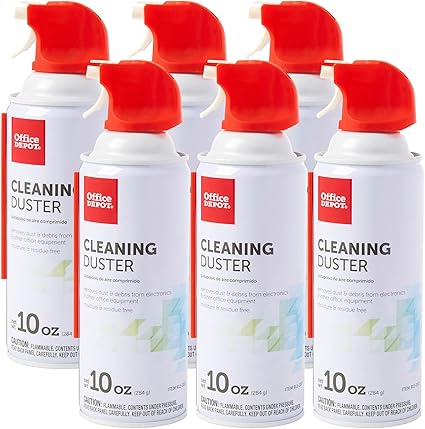
Offering a moisture-free formula, the Office Depot Compressed Air Duster suits anyone needing to clean dust, dirt, and lint from tight spots in electronics safely. Its set of six 10 oz cans gives you plenty of power for multiple cleaning sessions without worry about moisture damage.
Using the aerosol cans is straightforward and quick. Just point and spray to reach hard-to-get places inside your PC.
The moisture-free gas means no risk of dampness, keeping your components dry and safe. The bitterant included helps discourage misuse, which adds a layer of safety during use. Having six cans stocked feels reassuring for regular maintenance.
It efficiently blows away fine debris, making keyboard keys, fans, and other components visibly cleaner without needing contact. The build is solid for an aerosol product, and the six-pack quantity ensures you won’t run out soon. Most praise focuses on its strong, clean bursts of air.
Some mention the aerosol can’s limited grip as a slight inconvenience during longer cleaning chores.
The strongest praise lies in its effective dust removal combined with the moisture-free approach, keeping electronics safe and clean. The most common complaint is about the can’s handling, which some find a bit awkward during extended use.
Perfect for regular PC maintenance and lighter cleaning jobs, this pack suits those wanting a balanced combination of safety and quantity. Heavy users needing larger cans or a better grip might want to look elsewhere.
Pros
- Moisture-free formula for safe cleaning
- Comes in six 10 oz cans
- Bitterant added for safety measures
- Ease of use with aerosol spray
Cons
- Can grip feels slippery during long use
- Limited volume per can for heavy-duty cleaning
| Specification | Details |
|---|---|
| Brand Name | Office Depot |
| Unit Count | 6 Pack |
| Model Number | 110987 |
| Manufacturer Part Number | UDS10-MS-P6 |
| Warranty Description | 1-Year Limited |
6. Staples Compressed Air Duster 10 Oz Can

People who often clean their PC or other electronics will appreciate the Staples Compressed Air Duster. It suits anyone needing a reliable way to clear out dust and debris from tight spots.
Its biggest strength lies in the controlled airflow, which targets hard-to-reach places without blowing too hard.
Setting up for daily use is simple, with an easy-to-use nozzle providing precise bursts of air. It’s ready straight from the can, no assembly required. The can fits comfortably in hand for quick dusting jobs around keyboards, vents, and ports, making regular maintenance fuss-free and efficient.
The air duster effectively removes dust and dirt from sensitive electronics, helping to keep them working properly. The build is straightforward and sturdy, with a focus on functionality rather than fancy features. Most praise notes how well it cleans tiny spaces, while the common complaint centers on the limited content in a single 10 oz can lasting only moderate use before needing replacement.
The air duster is praised for its ability to clear dust from hard-to-reach places like vents and ports, keeping devices running smoothly. The biggest drawback is that the can’s size limits how long it lasts during frequent cleaning sessions. The nozzle design helps direct airflow precisely but can be delicate if not handled carefully.
Those who need straightforward, targeted dust removal for electronics will find this product very useful. People requiring larger volume or longer continuous use might want to explore bigger options. It works well in office or home settings where occasional cleaning maintains device performance without fuss.
Pros
- Controlled airflow reaches tight electronic spaces
- Easy-to-use nozzle for precision cleaning
- Removes dust effectively from various electronics
- Single can suitable for multiple devices
Cons
- 10 oz can size offers moderate usage time
- Nozzle can be fragile with rough handling
| Specification | Details |
|---|---|
| Brand Name | STAPLES |
| Number of Packs | 1 |
| Unit Count | 1 Count |
| Manufacturer Part Number | SPL10EN-1 |
| Use | Dust removal from electronics |
7. Electric Compressed Air Duster

Electric Compressed Air Duster suits anyone who needs to clean PC components regularly and wants a powerful, eco-friendly alternative to canned air. Its biggest strength is the 2X ultra-powerful brushless motor that produces a strong 52 m/s airflow, making quick work of even years-old dust.
Setting it up requires simply charging the unit, cutting down the need for buying disposable cans. Four adjustable wind speeds let you control airflow intensity, from gentle dusting to heavy-duty clean. The storm mode, activated by a long press, delivers maximum power for stubborn debris without risking device damage as it uses only dry, stable air.
Cleaning performance is impressive: even dust deep inside keyboards disappears in seconds thanks to the 130K RPM motor. Its build is solid and handheld, designed for repeated use without the usual waste. The praise focuses on how cost-effective and reusable it is, while the main criticism is that some wish it ran longer on a single charge.
The strongest praise points to the high airflow power that quickly blasts dust away, making cleaning both fast and thorough. The most common complaint centers on battery endurance, as some users find the charge could last longer during extensive cleaning sessions.
People needing regular, efficient PC cleaning and who prefer avoiding canned air will appreciate this product. Those requiring longer uninterrupted use or extra nozzles for fine detail work may want to explore other options better suited to their needs.
Pros
- Powerful 130K RPM motor for fast cleaning
- Four adjustable wind speed settings
- Rechargeable and reusable, eco-friendly
- Protects devices with dry, stable airflow
Cons
- Sometimes wish for longer battery life
- Only one item included, no extra accessories
| Specification | Details |
|---|---|
| Brand Name | ZOAIVR |
| Number of Items | 1 |
| Airflow Speed | 52 m/s |
| Motor Type | 2X ultra-powerful brushless motor |
| Warranty | 1 Year |
| Adjustable Wind Speeds | 4 Gears + storm mode |
8. Cordless Rechargeable Compressed Air Duster

CAGIWIRU Cordless Rechargeable Compressed Air Duster stands out for its powerful turbo fan that spins up to 130000RPM, making it ideal for anyone needing quick and efficient cleaning for PCs or other electronics. Its biggest strength lies in delivering strong airflow combined with portability and adjustable speed settings.
Charging takes about 3 hours using the included USB C cable, and it offers up to 240 minutes of run time at the lowest speed, which makes it convenient for long cleaning sessions without being tethered to a cord. The attached LED light and five different nozzles help tackle various cleaning tasks from keyboards to car interiors, all handled through a comfortable handheld design.
The compressed air duster does a solid job clearing dust and debris thanks to its high RPM motor. Build quality feels sturdy without being heavy, and the varying speed options give precise control when needed. Most praise highlights the long battery life on low speed, while some find the highest speed’s 25 minutes a bit short for larger jobs.
The product receives strong praise for its battery life and flexibility with multiple nozzles and speed options. A common complaint centers on the limited runtime when using the highest speed setting, which could interrupt longer cleaning projects.
People seeking a cordless, powerful duster with long low-speed use will appreciate this. Those needing extended high-speed cleaning sessions might want to consider a different model with longer run times at maximum power.
Pros
- Very long battery life at low speed
- Includes five different nozzles for versatility
- LED light aids cleaning in tight spaces
- Adjustable speed suits various tasks
Cons
- High-speed run time limited to about 25 minutes
- May feel a bit bulky for very detailed work
| Specification | Details |
|---|---|
| Power Source | Battery Powered |
| Voltage | 5 volts |
| Form Factor | Handheld |
| Speed | Up to 130000RPM |
| Charging Time | 3 hours |
| Usage Time (Lowest Speed) | 240 minutes |
9. FRESMOL 3-Speed Cordless Electric Air Duster

Quick and flexible, the FRESMOL 3-Speed Cordless Electric Air Duster suits anyone looking for a rechargeable alternative to canned air. Its cordless design combined with three adjustable speeds gives you control over how much power you need, making it handy for delicate or stubborn dust clearing.
Charging up is straightforward, and the smart LED display keeps an eye on battery life and speed mode, so you won’t get caught off guard during a cleaning session. The variety of nozzles and brushes included make switching between different cleaning tasks simple, whether you’re tackling a keyboard, PC fans, or tight spots in the car.
With a 100000RPM motor, it moves plenty of air to blast dust out of small crevices. The build feels solid, and the battery life lasts long enough for most jobs.
The clear LED display stands out as a handy feature, while some note that the device can be a bit noisy when running at full speed.
Many appreciate the clear LED display that helps track battery and speed, making use straightforward. The strongest complaint involved the noise level when set to full power, which might be disruptive in quiet settings.
People who want a rechargeable, versatile air duster with useful attachments will find this suits their needs. Those sensitive to noise or who require extended run time might want to consider other options.
Pros
- Cordless design for easier maneuvering
- Multiple speed options for different cleaning needs
- Smart LED display for battery and speed monitoring
- Variety of nozzles and brushes included
Cons
- Can be noisy on highest speed
- Battery life may limit long sessions
| Specification | Details |
|---|---|
| Speed Settings | 3 Adjustable Speeds |
| Motor Speed | 100000RPM |
| Included Accessories | 5 Nozzles & 3 Brushes |
| Manufacturer Part Number | VC018 |
| Warranty | 1 Year Manufacturer |
10. Rechargeable 3-Speed Handheld Compressed Air Duster

Quickly blasting away dust makes this rechargeable air duster a solid pick for PC cleaning and household use. It suits you best when you want strong airflow combined with adjustable speeds to handle everything from keyboards to air filters. Power and comfort stand out as its main advantages.
Setting it up is simple with a single handheld unit that fits comfortably in your palm thanks to its ergonomic curves. The three-speed settings let you control airflow intensity easily, making it practical for tackling different cleaning tasks.
Its brushless motor ensures consistent performance without much noise or vibration.
The air moves at an impressive 125000 RPM with speeds over 35+m/s, so even stubborn dust and debris get removed quickly. The design avoids sharp edges, making it comfortable during extended use.
Most praise mentions the powerful airflow and ease of handling, while complaints tend to focus on weight during longer cleaning sessions.
Powerful airflow combined with a comfortable ergonomic grip makes cleaning efficient, though some find the weight tiring after longer periods. The adjustable speeds add flexibility for various tasks, keeping the tool handy for different surfaces and debris types.
Anyone looking for strong air pressure and easy control will appreciate this model. Users needing a lighter or multi-pack option might want to explore alternatives better suited for extended use or larger projects.
Pros
- Powerful airflow exceeding 35+m/s
- Three adjustable speed settings
- Ergonomic, comfortable grip design
- Brushless motor for quieter operation
Cons
- May feel heavy during extended use
- Single pack only, no extra accessories
| Specification | Details |
|---|---|
| Model Number | TF2 |
| Manufacturer Part Number | TF02 |
| Unit Count | 1 Count |
| Brand Name | OYEMIA |
| Number of Items | 1 |
11. Fanttik B10 Pro Electric Air Duster

Compact and lightweight design makes the Fanttik B10 Pro Electric Air Duster easy to handle and store. Ideal for anyone needing a portable air blower to keep their PC and workspace dust-free. Its biggest strength lies in delivering strong airflow through a brushless motor with three speed settings.
Setup is straightforward with no cords to worry about, so you can grab and use it anytime. The small size and light weight mean it fits comfortably in your hand and doesn’t add bulk to your tools.
The circular LED lighting helps clearly see dust in hidden corners inside your PC case and around your desk.
The air duster pushes air at 65 m/s and can boost to 110000 RPM instantly, clearing dust efficiently from keyboards and desktops. It’s built with quality materials to feel sturdy yet light at only 0.61 lb. People praise its portability and strong airflow most.
A common downside mentioned is the battery life, which could be limiting during extended cleaning sessions.
The product delivers excellent airflow with its powerful brushless motor and quick boost feature. Many appreciate how the LED lights illuminate tricky spots when cleaning. The most frequent complaint revolves around its battery duration being a bit short for longer jobs.
Ideal for people who want a portable, cordless duster for quick and easy cleaning sessions. Those needing longer continuous use or heavier-duty cleaning might want to consider a model with longer battery life or a wired option.
Pros
- Compact and very lightweight for easy handling
- Strong airflow with three-speed control
- Circular LED lighting for better visibility
- Brushless motor ensures reliable performance
Cons
- Battery life may not last for long cleaning tasks
- Small size limits continuous use without recharging
| Specification | Details |
|---|---|
| Model Number | B10 Pro |
| Unit Count | 1 Count |
| Weight | 0.61 lb |
| Air Speed | 65 m/s |
| Maximum RPM | 110000 RPM |
| Size | 3.3×1.8×5.9 inches |
12. METROVAC DataVac ED500 Electric Air Duster

Powerful airflow stands out immediately, making it a solid choice for anyone needing serious dust removal from computers and other electronics. It suits those who want a reusable and eco-friendly alternative to canned air, with enough strength to tackle not just PCs but other dusty spots around the house.
Using it requires just plugging in, no fuss with refills or replacing sprays. The electric motor delivers steady bursts of air at the press of a trigger, allowing for controlled cleaning of delicate parts like keyboard crevices or fan vents.
It’s handy for spot cleaning, and its design doesn’t tire your hand during longer sessions since it’s relatively lightweight and easy to maneuver.
The motor pushes out a strong air stream that easily dislodges stubborn dust and pet hair. The build feels sturdy and solid without being overly heavy, so it handles frequent use comfortably. While the airborne power impresses, some mention the cord length could be longer for larger areas.
The main praise centers on its effectiveness and savings from not buying disposable cans.
Strongest praise highlights the electric duster’s powerful air stream that clears stubborn dust effectively and avoids ongoing costs linked to single-use air cans. The most frequent downside mentioned concerns the cord, which some find too short for extensive cleaning without moving between outlets.
This tool fits anyone wanting reliable, reusable dust removal mainly around electronics and household spots needing frequent upkeep. Those requiring cordless freedom or very long range may want to explore alternatives offering untethered operation.
Pros
- Powerful airflow removes tough dust and pet hair
- Eco-friendly, no need for disposable air cans
- Versatile for cleaning beyond computers
- Lightweight design for easy handling
Cons
- Cord length may limit reach in bigger rooms
- Not cordless, which reduces maneuverability
| Specification | Details |
|---|---|
| Brand Name | METROVAC |
| Model Number | ED-500 |
| Number of Items | 1 |
| Unit Count | 1 Count |
| Manufacturer Part Number | FBA_ED-500STR-Wht |
Best Air Dusters for Cleaning PC Comparison Table
| Product | Warranty | Included Components | Unit Count | Model Number |
|---|---|---|---|---|
| WOLFBOX MF60 Duster | 24 Months Manufacturer | – | 1 Count | MegaFlow 60 |
| WOLFBOX MegaFlow 50 | 24 Months Manufacturer | 1 Battery, 4 Nozzles | 1 Count | MF 50 |
| WOLFBOX MF100 Duster | 24 Months Manufacturer | Brushes, USB Cable | 1 Count | MegaFlow100 |
| Fanttik B10 Pro Max | – | – | 1 Count | B10 Pro Max |
| Office Depot Air Duster | 1-Year Limited | – | 6 Pack | 110987 |
| Staples Air Duster | Contact Manufacturer | – | 1 Count | – |
| Generic Electric Duster | 1 Year | – | 1 Count | – |
| Cordless Rechargeable Duster | – | Rechargeable | 1 Count | – |
| FRESMOL 3-Speed Duster | 1 Year Manufacturer | Instruction manual | 1 Count | VC018 |
| Rechargeable 3-Speed Duster | – | – | 1 Count | TF2 |
| Fanttik B10 Pro | – | – | 1 Count | B10 Pro |
| METROVAC DataVac ED500 | – | – | 1 Count | ED-500 |
- Warranty24 Months Manufacturer
- Included Components–
- Unit Count1 Count
- Model NumberMegaFlow 60
- Warranty24 Months Manufacturer
- Included Components1 Battery, 4 Nozzles
- Unit Count1 Count
- Model NumberMF 50
- Warranty24 Months Manufacturer
- Included ComponentsBrushes, USB Cable
- Unit Count1 Count
- Model NumberMegaFlow100
- Warranty–
- Included Components–
- Unit Count1 Count
- Model NumberB10 Pro Max
- Warranty1-Year Limited
- Included Components–
- Unit Count6 Pack
- Model Number110987
- WarrantyContact Manufacturer
- Included Components–
- Unit Count1 Count
- Model Number–
- Warranty1 Year
- Included Components–
- Unit Count1 Count
- Model Number–
- Warranty–
- Included ComponentsRechargeable
- Unit Count1 Count
- Model Number–
- Warranty1 Year Manufacturer
- Included ComponentsInstruction manual
- Unit Count1 Count
- Model NumberVC018
- Warranty–
- Included Components–
- Unit Count1 Count
- Model NumberTF2
- Warranty–
- Included Components–
- Unit Count1 Count
- Model NumberB10 Pro
- Warranty–
- Included Components–
- Unit Count1 Count
- Model NumberED-500
How to Choose the Best Air Duster for PC Cleaning
Choosing an effective air duster for PC cleaning depends on factors like airflow strength, nozzle precision, and ease of use, which ensure thorough dust removal without damaging components. Selecting the right features helps prevent costly repairs and prolongs the lifespan of your computer.
Airflow Power and Control
Using a duster with too weak of an air blast often leaves dust stuck between heatsinks and on fan blades, requiring multiple attempts to clean properly. An overly strong blast risks blowing smaller components loose or causing static shock. Dust removal becomes more efficient with adjustable airflow settings, which allow dialing the power down for sensitive parts and up for stubborn dust.
Look for models offering at least two speed settings and a steady air pressure near 30 PSI for general use. Consistency matters as well, a duster that starts strong but weakens quickly makes cleaning uneven and frustrating.
Maintaining a continuous, controlled output helps you finish faster without coming back to missed spots.
Safety Features
A common problem is moisture or residue left behind by cheaper canned dusters that can corrode PC components or cause shorts. Selecting a tool made with non-toxic, moisture-free compressed air prevents these risks.
Antistatic features play a critical role in avoiding damage from static electricity, which can fry delicate circuits.
Devices with built-in antistatic coatings or grounding mechanisms reduce the chance of static discharge during use. Also, nozzles prone to clogging will choke airflow and need frequent cleaning, interrupting your work.
Choose a duster designed with smooth, wide openings or replaceable tips to maintain reliable air delivery.
Portability and Size
Cleaning inside a PC requires moving around tight corners and cramped spaces, so a tool that’s too bulky or heavy tires your hand quickly. Ergonomic handles and lightweight construction allow for longer cleaning sessions without discomfort. A narrow nozzle or one with a flexible extension is crucial for reaching between RAM sticks or behind motherboard connectors.
Consider cordless models to avoid getting tangled in cords or restricting your movement. When wired, the cord’s length and thickness should let you comfortably lean over your setup. Dimensions under 12 inches with a slim nozzle generally offer the best balance between reach and manageability.
Noise Level
Loud air dusters can be tiresome to use, especially in shared workspaces or early morning cleaning sessions. Many electric models produce noise levels above 70 decibels, which is roughly the sound of a vacuum cleaner. Quieter options with mufflers or noise-dampening housings reduce the strain on your ears.
Finding a balance between airflow power and noise matters. A very quiet device might underperform while a noisy one could be too aggressive for delicate parts. Aim for a noise rating around 60-65 decibels if you plan frequent cleaning, keeping in mind a slight rise might be acceptable if airflow and control are excellent.
Power Source and Runtime
Battery-powered air dusters offer cordless convenience but often limit runtime to 10-15 minutes per charge. Electric models deliver longer continuous use without interruption but need a power outlet, which might restrict positioning. Your cleaning schedule and workspace setup influence which power source fits best.
Rechargeable batteries are more cost-effective over time than disposable ones but check the replacement cost for either type. An electric unit with compatible universal power supplies can be handy for travel or multiple regions. Ensure continuous runtime meets your cleaning session length to avoid frequent pauses.
Proper Techniques for Using Air Dusters to Safely Clean Your PC
Holding the can of air duster upright is crucial to avoid releasing any freezing liquid that can damage delicate PC components. Short, controlled bursts are more effective than a long blast, allowing dust to be dislodged without spreading it deeper inside the case.
It’s best to blow air onto the components from a slight distance to minimize any risk. Target keyboard crevices, fans, and heatsinks each time, moving slowly to ensure thorough cleaning. Avoid spinning fans manually during cleaning, as this can generate unwanted current that might harm the system.
After blowing out dust, a soft brush can help remove any remaining particles. Make sure to power off and unplug the PC before starting, preventing any accidental shorts or damage.
Proper ventilation is advised to prevent inhaling dust stirred up during the process.
Maintaining and Storing Air Dusters for Long-Lasting Performance
Once empty, never attempt to puncture or refill an air duster can as it contains pressurized gas that can be hazardous. Store the can in a cool, dry place away from direct sunlight and heat sources to preserve the propellant’s effectiveness. Keeping the nozzle clean prevents clogging; wipe it gently with a dry cloth after each use.
Shake the can before every use to ensure consistent pressure while spraying. It’s helpful to store air dusters upright to avoid liquid propellant buildup inside the nozzle.
Most cans come with a detachable straw or nozzle attachment; store these together with the can to keep the spray precise for future cleanups. Avoid dropping or shaking the can excessively, as this can affect performance or cause leaks.
Comparing Compressed Air Dusters with Alternative PC Cleaning Solutions
Compressed air dusters are convenient for reaching tight spaces inside a PC without physical contact. Unlike vacuum cleaners, they don’t create suction, so there’s less risk of damaging small components or cables.
Brushes allow for controlled removal of dust but can leave particles suspended and require extra cleanup. Some users prefer electric air blowers, which provide continuous airflow but tend to be bulkier and less portable. Canned air provides a quick and effective way to blow dust from fans and heatsinks, which brushes or cloths cannot reach easily.
However, they have limited use and require replacement once empty, while electric tools are reusable. Vacuum solutions may pick up debris but can generate static electricity that poses a threat to sensitive electronics during cleaning.
People Also Asked
How Do I Safely Use an Air Duster on My PC?
Hold the can upright and use short bursts to avoid moisture build-up inside your PC. Keep the nozzle a few inches away from components to prevent static or physical damage. It’s helpful to do this in a well-ventilated area to avoid inhaling propellant gases.
What Size Air Duster Is Ideal for Cleaning Computer Parts?
A 10 to 15-ounce can is usually sufficient for most PC cleaning jobs. This size is manageable and costs less to replace compared to larger cans. It provides enough air to clean fans, heatsinks, and keyboards without being overly bulky.
Can Air Dusters Damage Sensitive Computer Components If Used Wrong?
Yes, using an air duster upside down can spray liquid propellant that may damage components. Also, too close or prolonged spraying risks static discharge or loosening small parts. Move the can steadily and avoid direct contact with sensitive chips and connectors.
How Long Does a Typical Air Duster Can Last with Regular Use?
A typical 10 to 15-ounce air duster can lasts for about 10 to 15 minutes of active use. Usage time depends on the frequency and length of bursts. Storing the can at room temperature helps maintain consistent pressure and performance.
What Common Problems Occur When Cleaning a PC with an Air Duster?
A common issue is moisture from the spray when the can is tilted or used too long, which can cause short circuits. Dust may just relocate instead of fully leaving the case if airflow is blocked. Fans can spin uncontrollably fast, potentially causing damage, so holding them still is advisable.
Conclusion
Choosing an air duster for cleaning your PC largely comes down to how powerful it is, how easy it is to control the airflow, and whether it can reach tight spots without spilling moisture. Durability and the ability to safely remove dust without damaging components are also important. Keeping these points in mind helps you avoid common problems like spreading dust around or accidentally hurting sensitive parts.
Consider how often you plan to clean your PC and the size of your workspace when picking a model, since some last longer on a single refill or plug in directly for frequent use. A budget that fits your willingness to replace or recharge the duster regularly also matters. Check the comparison table and the detailed picks above to find one that fits your needs best.