
Top 12 Best Computer Air Duster That Will Blow You Away!
Common experience with cheap or unsuitable air dusters includes weak airflow that barely clears dust from keyboard crevices or delicate computer fans. The best computer air duster delivers consistent and strong bursts of air that remove dust without causing moisture buildup or damaging fragile internal parts. Low-quality cans often run out quickly or require multiple shakes, interrupting the cleaning job and possibly leaving residue behind.
A good computer air duster usually features a strong, steady pressure around 30-50 PSI to dislodge dust efficiently while being safe for electronic components. Size matters as well, a compact can with a long, narrow nozzle reaches tight spaces better than bulky models.
The material should be reliable enough to prevent leaks or freezing during extended use, and ease of control helps avoid sudden bursts that could scatter dust instead of clearing it.
Need a Quick Check?
| Image | Product | Price |
|---|---|---|
Our Top Picks 1  | WOLFBOX MF60 Duster | Check Price |
Our Top Picks 2  | WOLFBOX MegaFlow 50 | Check Price |
Our Top Picks 3  | Super Power Cordless Duster | Check Price |
Our Selected Top 12 Computer Air Duster Picks for Every Need
This list features carefully chosen computer air dusters designed for effective cleaning and maintenance. Each option is evaluated on performance, usability, and suitability for different users, highlighting strengths and weaknesses to help find the best match for your specific cleaning needs.
1. WOLFBOX MF60 Compressed Air Duster
110,000 RPM power sets this air duster apart for anyone needing serious dust removal from keyboards, PC cases, and fans. Suited for PC gamers and tech enthusiasts, it tackles even the tiniest dust particles and crumbs with ease, making deep cleaning quick and effective.
Setup is straightforward with its lightweight 0.5 lbs design and built-in batteries. Three speed settings offer flexibility: gentle 25,000 RPM for delicate parts, 60,000 for regular dust, and a full blast of 110,000 RPM for stubborn debris. Long runtime on the lowest setting allows extended cleaning without constant recharging, which takes only 3.5 hours.
Performance matches the powerful motor rating, easily blowing away dust in every test. It feels solid and well-made, easy to handle during use. The strongest praise notes its impressive air output and battery life, while a common complaint points to limited power on lower settings for really fine dust removal.
Strong air output and exceptional battery life get highlighted the most. Some find the lower speed settings less effective for very fine dust, which can be an issue for delicate cleaning tasks. The device feels well balanced and easy to hold during extended use.
People doing recurring, intense cleaning sessions will appreciate its battery and power. Those mainly aiming for ultra-fine dust removal on delicate items might want to consider an alternative tool with more nuanced airflow control.
Pros
- Powerful 110,000 RPM air output
- Three-speed settings for precision
- Lightweight and easy to carry
- Long runtime with quick recharge
Cons
- Lower speeds may struggle on fine dust
- Charging takes over 3 hours
| Specification | Details |
|---|---|
| RPM Speeds | 25K / 60K / 110K RPM |
| Weight | 0.5 lbs |
| Battery Capacity | 2*2500mAh |
| Charging Time | 3.5 hours |
| Runtime | Up to 240 mins on Gear 1 |
| Warranty | 24 Months Manufacturer |
2. WOLFBOX MegaFlow 50 Compressed Air Duster
Great for anyone needing a reliable way to clean dust off delicate electronics, the WOLFBOX MegaFlow 50 electric air duster shines through its adjustable speed settings. Its biggest advantage is the power it offers across three speeds, helping with everything from light dusting to stubborn debris removal.
Daily use is straightforward thanks to its lightweight design at just 0.45 lb and portable size. The included lanyard keeps it handy whether you’re indoors or outdoors. It runs on a rechargeable lithium-ion battery, so there’s no fuss about replacing cans.
Four different nozzles fit various cleaning situations, and switching speeds lets you control the airflow strength for different needs.
The air duster reaches up to 110,000 RPM, delivering strong blasts of air that clear dust efficiently from keyboards, vents, and hard-to-reach spots. The build is solid, aimed at long-term use, and the 24-month warranty backs its durability.
The main praise for the product focuses on its power and reuse benefits, while the most common complaint is related to battery life limitations during extended use.
The device earns praise for its strong air blast and reusable battery setup, which saves money over disposable cans. A frequent issue mentioned is the battery not lasting very long during prolonged use. The strong RPM performance and adjustable speeds manage a wide range of cleaning tasks effectively.
People who need an eco-friendly, powerful air duster for frequent short cleaning tasks will appreciate this. Those requiring long uninterrupted use or very quick nozzle swaps might want to explore other options better suited for heavy-duty demands.
Pros
- Adjustable speed settings for versatile cleaning
- Lightweight and portable with lanyard
- Rechargeable and reusable, no cans needed
- Several nozzle options included
Cons
- Battery life may limit long cleaning sessions
- Nozzle attachment changes can be fiddly
| Specification | Details |
|---|---|
| Speed Settings | Three adjustable speeds |
| Maximum Speed | 110,000 RPM |
| Weight | 0.45 lb |
| Included Components | 1 Lithium Ion Battery, 4 Nozzles |
| Warranty | 24 Months Manufacturer |
3. Super Power Cordless Compressed Air Duster
Among rechargeable air dusters, this one stands out with a powerful turbo fan reaching speeds up to 130000RPM. It suits people looking to clean electronics, cars, and home areas efficiently, especially where adjustable speed and long battery life matter most.
Setup is quite simple thanks to the included USB C fast charging cable, which takes about 3 hours to charge fully. It offers four charging options to fit different needs. Day-to-day use is flexible with three speed settings, so you can save battery or crank up power for tough dust.
The attached LED light helps illuminate dark corners while cleaning.
Performance-wise, it removes dust and debris well, especially at higher speeds, handling keyboards and car interiors with ease. The build feels sturdy in hand and the variety of five nozzles covers many cleaning scenarios. Most praise highlights the long runtime on low speed, while a common complaint is the shorter use time at the highest speed.
The air duster excels at providing long runtimes when using lower speeds, making it a reliable choice for thorough cleaning sessions without frequent recharging. The main drawback is the significant drop in runtime at the turbo fan’s highest speed, which limits continuous heavy-duty use.
Anyone needing a cordless solution for versatile cleaning tasks around electronics, cars, or offices will appreciate the performance and attachments offered. Those requiring extended heavy blasting power might want to consider other options with longer high-speed runtimes.
Pros
- Adjustable speeds for different cleaning needs
- Comes with five nozzle attachments
- Long battery life on low setting
- USB C fast charging included
Cons
- Highest speed lasts just 25 minutes
- May be bulkier than canned air alternatives
| Specification | Details |
|---|---|
| Power Source | Battery Powered |
| Voltage | 5 volts |
| Speed | Up to 130000RPM |
| Charging Time | 3 hours |
| Usage Time | Up to 240 minutes on lowest setting |
| Additional Features | Rechargeable, LED light, Three Speed Settings |
4. Falcon DPSM Disposable Duster

Falcon DPSM Disposable Duster delivers powerful dust removal for keyboards, laptops, CPUs, and other electronics. It’s a solid choice for anyone needing precise compressed air cleaning, especially in tight, hard-to-reach spots.
Its biggest strength lies in the included extension straw that targets those tricky crevices.
Using it around the house or office is straightforward. Simply attach the precision cleaning straw to the can, and you are ready to blow dust out of vents, keyboards, or cameras.
The 7 oz can lasts long enough for frequent use without needing quick replacements. The added bitterant in the formula offers a level of safety by discouraging inhalation, which is helpful for those mindful of chemical exposure.
The compressed air sprays powerfully and steadily, making it easy to clear out stubborn dust. The build of the disposable can feels sturdy and easy to handle. Most praise focuses on how well the straw reaches tight spaces, while a common downside is the limited amount of air for really large or extended jobs.
Strong praise centers on the effective reach of the extension straw, making those hard-to-reach areas easy to clean. The main complaint is how quickly the air runs out when used on deeper or bigger projects, so it’s less ideal for continuous heavy-duty use.
Anyone looking for a reliable, disposable duster for everyday cleaning of electronics and small spaces will appreciate this product. Those needing more air volume or a refillable option should consider alternatives with a higher capacity.
Pros
- Powerful blast removes dust effectively
- Extension straw reaches tight spots
- 7 oz can lasts through multiple cleans
- Bitterant reduces risk of inhaling fumes
Cons
- Air supply limited for very large jobs
- Single can means no refills or reloads
| Specification | Details |
|---|---|
| Brand Name | Falcon |
| Unit Count | 1 Count |
| Included Components | 7 oz Air Duster, Extension tube |
| Model Number | FALDPSM |
| Manufacturer Part Number | DPSM |
5. Staples Compressed Air Duster

Feels powerful when used, making it easy to clear dust from tight spots on electronics. Best suited for anyone needing quick, effective cleaning of keyboards, computers, or other devices without fuss. Its strongest point is how well it reaches hard-to-clean areas with a controlled, precise airflow.
Setup involves attaching or simply using the nozzle provided, which feels sturdy and gives good control over the airflow direction. On a daily basis, there’s no complicated assembly or maintenance. It easily fits into small spaces behind computers or inside keyboards, making regular cleaning less of a chore and more of a quick fix.
It performs well at removing dust, dirt, and debris from various electronics like gaming consoles and printers. The design is straightforward and feels reliable, though some might wish it came in multi-packs. Strong praise usually points to the precision cleaning, while a common complaint is a desire for extra cans in one purchase.
The most appreciated feature is the precise airflow that reaches into vents and ports without waste. A problem some mention is that it only comes as a single can, which might mean running out quickly for heavy users.
This product suits those who want a straightforward, dependable air duster for occasional to moderate cleaning tasks. People needing constant or large-scale cleaning might look for multi-pack options elsewhere.
Pros
- Controlled airflow reaches tight spaces
- Effective dust removal from electronics
- Simple, easy-to-use nozzle
- Good for a variety of devices
Cons
- Sold as single cans only
- No multi-pack option available
| Specification | Details |
|---|---|
| Brand Name | STAPLES |
| Number of Packs | 1 |
| Number of Items | 1 |
| Unit Count | 1 Count |
| Manufacturer Part Number | SPL10EN-1 |
6. WOLFBOX MF100 Compressed Air Duster

Powerful yet versatile, the WOLFBOX MF100 Compressed Air Duster suits anyone wanting a reliable way to clean electronics and small spaces. Its most notable strength is the super fast turbo fan reaching up to 150,000 RPM, making dust removal quick and thorough.
Setup is straightforward thanks to the included USB cable, allowing easy recharging. With three speed settings, you can adjust the airflow to match delicate computer parts or tougher jobs around the house.
The multiple nozzles and brushes offer flexible cleaning options, making it practical for keyboard keys, PC fans, and even car interiors.
It performs well at removing dust with an impressive wind speed of 79 m/s. The build feels solid and durable for repeated use. Reviews often praise its powerful airflow, though some point out that the noise level at high speed can be a bit loud during extended use.
The strongest praise centers on the device’s ability to produce high-speed airflow that cleans deeply in tight spaces. The most common complaint highlights the loud noise it makes at the top setting, which some find bothersome during longer use sessions.
Anyone needing a versatile tool for electronics and occasional home cleaning will appreciate its power and included accessories. People sensitive to noise or looking for longer battery life might want to explore other options.
Pros
- Powerful airspeed for efficient dust removal
- Multiple nozzles and brushes included
- Rechargeable via USB for convenience
- Three adjustable speed settings
Cons
- Can get noisy at highest speed
- Battery life not specified
| Specification | Details |
|---|---|
| Wind Speed | 79 m/s |
| Max Fan Speed | 150,000 RPM |
| Speed Settings | 3 adjustable |
| Included Components | Brushes, USB Cable |
| Warranty | 24 Months Manufacturer |
7. Super Power Compressed Air Duster

Plastic casing and a compact design make the Super Power Compressed Air Duster a convenient tool for anyone needing a stronger way to blast away dust. Its biggest strength lies in the adjustable settings combined with a powerful brushless motor reaching up to 150,000 RPM, perfect for different cleaning jobs around computers or electronics.
Using the JUFINX X117 is straightforward; it comes ready to go with a rechargeable battery that lasts up to 4 hours at the lowest setting. Charging through Type-C is quick and familiar, so you won’t waste time looking for special cables.
The adjustable airflow lets you pick the right power level, making it flexible when cleaning tight spaces or bigger dust buildups.
The airflow speed of 52 m/s delivers strong performance by effectively managing dust, while the three power modes come in handy for different tasks. Built solidly, it feels durable rather than fragile.
Users applaud its long battery life, but some mention it’s a bit louder than expected during operation, which might be a minor annoyance.
The strongest praise highlights the long-lasting rechargeable battery combined with effective dust removal power. The most frequent complaint is the noise level, which some find higher than they preferred for indoor use. Despite that, the motor’s speed and airflow do a solid job tackling dust in different scenarios.
People who want a reusable and strong air duster with adjustable settings will find this very useful. Those sensitive to noise or looking for multiple accessories in a pack might want to explore other options instead.
Pros
- Powerful brushless motor with high RPM
- Battery lasts long on low setting
- Three adjustable airflow levels
- Rechargeable via common Type-C cable
Cons
- Can be louder than expected during use
- Single unit package only, no extras included
| Specification | Details |
|---|---|
| Brand Name | JUFINX |
| Model Number | JUFINX-X117 |
| Airflow Speed | 52 m/s |
| Battery Life (1st Gear) | Up to 4 hours |
| Charging Port | Type-C |
| Warranty | 2-year warranty |
8. Ultra-Powerful Electric Compressed Air Duster

Ultra-powerful airflow stands out immediately with this electric air duster, ideal for anyone who regularly cleans dust from keyboards and electronics. Its biggest strength lies in the 2X brushless motor creating gusts strong enough to remove years of built-up dust quickly and effectively.
Setting up requires just a quick charge since it’s rechargeable and intended to replace canned air. Daily use is simple, with four adjustable wind speeds, allowing you to control airflow from gentle to heavy-duty cleaning.
Holding the button triggers an even stronger storm mode to handle stubborn debris without extra effort.
Performance in clearing out dust is impressive, blasting old dirt from keyboards in seconds thanks to the powerful 130,000 RPM motor. The build feels solid and well thought out for repeated use, supported by a 1-year warranty.
The most common complaint is the need to manage battery life, though the advantage of not buying disposable cans often outweighs this.
Strongest praise highlights the intense airflow removing years of dust effectively in just seconds. Common complaints center on managing battery charge and occasional concerns about how long it lasts between uses. It handles heavy cleaning tasks swiftly but requires monitoring for optimal convenience.
Those looking for a powerful, reusable solution to keep electronics dust-free will appreciate this model. People needing extended usage without recharging or a backup should consider additional options or multiple units. Perfect for regular home or office cleanups where fast, efficient dust removal matters most.
Pros
- Powerful 130K RPM brushless motor
- Rechargeable and eco-friendly alternative
- Four adjustable wind speed levels
- Long-lasting, durable build quality
Cons
- Battery life requires occasional recharging
- Single unit pack may limit backup availability
| Specification | Details |
|---|---|
| Brand Name | ZOAIVR |
| Manufacturer Part Number | C0033-B01-B1 |
| Number of Items | 1 |
| Wind Speed | 52 m/s airflow |
| Motor Speed | 130K RPM |
| Warranty Description | 1 Year |
9. WOLFBOX MF200 Compressed Air Duster
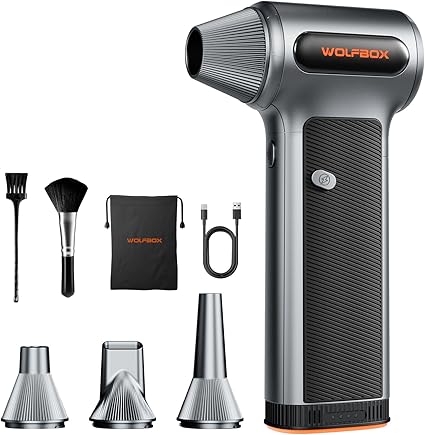
Ideal for anyone who needs extended cleaning sessions without interruptions, the WOLFBOX MF200 Compressed Air Duster offers a removable battery system that keeps it running longer than most competitors. Its strongest feature is the continuous operation enabled by swappable batteries, making it perfect for tackling large or multiple devices in one go.
Getting started is straightforward thanks to the flexible charging options; you can charge the duster or its removable battery via Type-C in about 2.5 hours. During daily use, swapping batteries takes mere seconds, allowing up to 100 minutes of cleaning at the lowest speed setting without waiting for a recharge. It’s a solid choice for anyone who regularly cleans computers or electronics and needs a reliable power supply.
Performance-wise, the high-performance brushless motor generates a strong airflow of 87.5 m/s, which blasts dust away efficiently from tight spots. The build feels sturdy and practical, designed for durability and continuous use.
Most users praise the powerful air output, while some mention that backup batteries are sold separately, which can be an additional expense and inconvenience.
The air duster delivers a powerful blast of air that cleans dust instantly, backed by a durable build. Users appreciate how battery swapping prevents downtime, but some find the need to purchase extra batteries separately less convenient. Charging is fast, yet the battery life at higher speeds is not as clear.
Anyone who cleans multiple computers or electronics regularly will benefit from the long runtime and non-stop operation. Casual users might prefer a simpler, less expensive option without the removable battery system. This model suits those who value power and extended use above all.
Pros
- Removable battery for continuous use
- Fast Type-C charging in 2.5 hours
- Strong airspeed of 87.5 m/s
- Long operation time up to 100 minutes
Cons
- Backup batteries sold separately
- Limited operation time at higher speeds not specified
| Specification | Details |
|---|---|
| Model Number | MF200/PROMAX |
| Airflow Speed | Up to 87.5 m/s |
| Battery Capacity | 22.2Wh (removable) |
| Charging Time | 2.5 hours via Type-C |
| Operation Time | Up to 100 minutes at lowest speed |
| Warranty | 24 months |
10. GOOLOO F3 Compressed Air Duster
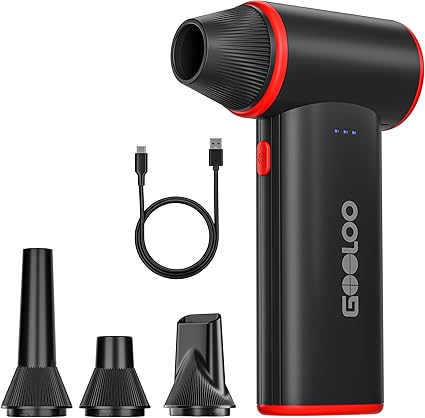
Dust and debris buildup on computers and gear never gets pleasant, especially when normal dusters barely shift stubborn dirt. Designed for cleaning electronics and more, the GOOLOO F3 Compressed Air Duster delivers turbo performance with 150,000 RPM wind that blasts away even the toughest particles.
Using the duster day-to-day means quick setup with a straightforward handheld design. It feels light enough to hold steadily while targeting keyboards, desktops, or car dashboards. It replaces the usual cloth or broom with a strong electric blow, saving time and reducing dust residues that often require multiple wipes.
Versatility extends to small appliances and outdoor gear, so most chores get tackled with just one tool.
Performance delivers solid results thanks to the high-pressure air blast, clearing dust without scrubbing. Build quality feels sturdy for repeated use and the motor sound stays within reasonable levels.
The most appreciated feature is the reliable power that handles diverse cleaning jobs. A frequent frustration is the lack of long nozzle attachments for more precise or hard-to-reach spots.
The strongest praise highlights the device’s powerful wind speed that effectively removes tough dust without physical scrubbing. Common complaints revolve around the absence of nozzle extensions, making it harder to clean small crevices accurately. The motor and build quality generally meet user expectations for longevity and strength.
This air duster fits well for people focused on cleaning computers, home gadgets, and vehicles quickly with strong airflow. Those needing to clean very narrow or precise areas might prefer options with multiple nozzle attachments for better control and reach.
Pros
- High-pressure wind at 150,000 RPM
- Works on electronics, home, car, and outdoor gear
- Handheld design for easy use
- 18-month warranty included
Cons
- No extended nozzle for tight spaces
- Some noise during operation
| Specification | Details |
|---|---|
| Brand Name | GOOLOO |
| Model Number | F3 |
| Manufacturer Part Number | X201 |
| Number of Items | 1 |
| Warranty Description | 18 Months |
11. FRESMOL Compressed Air Duster

Reaches speeds up to 100000RPM, making it ideal for clearing dust from keyboards, PC fans, and small crevices. A rechargeable electric blower replaces disposable cans, perfect for someone wanting a long-term, cordless solution for cleaning electronics and other delicate environments.
Setup is straightforward, involving just charging before first use. Daily cleaning feels customizable thanks to three adjustable speeds, allowing gentler airflow for sensitive areas or stronger bursts for tougher dust. The smart LED display shows the speed mode and battery level clearly, so you always know when to recharge.
Attachments like five nozzles and three brushes add convenience for detailed cleaning tasks around laptops, vents, and car interiors.
Strong motor performance efficiently blasts dust away from tight spaces, helping maintain clean devices without much effort. The sturdy build feels reliable, and the cordless design offers great mobility.
Positive reviews often highlight its powerful airflow and battery life. Some mention the battery can run out quicker than expected, which requires monitoring the display to avoid surprises.
Strong airflow and a clear LED display make it very convenient, though occasional battery drain is common during extended use. The variety of attachments supports efficient cleaning in hard-to-reach spots.
Ideal for anyone needing frequent, detailed dusting of electronics without disposable cans. Those wanting extra-long battery life or multiple devices cleaned at once might prefer alternatives with bigger capacity or multiple units.
Pros
- Rechargeable and cordless for easy portability
- Smart LED display shows speed and battery life
- Multiple nozzles and brushes for detailed cleaning
- Adjustable airflow for delicate or heavy dusting
Cons
- Battery life may be shorter than desired
- Single unit may limit simultaneous cleaning of many devices
| Specification | Details |
|---|---|
| Motor Speed | 100000RPM |
| Number of Speeds | 3 Adjustable Speeds |
| Included Components | Instruction manual |
| Number of Items | 1 |
| Warranty Description | 1 Year Manufacturer |
| Manufacturer Part Number | VC018 |
12. Rechargeable Handheld Compressed Air Duster

Perfect for anyone who needs a reliable tool to clear dust from keyboards, vents, and filters, this rechargeable air duster delivers powerful airflow in a compact design. Its standout feature is the impressive 125000 RPM motor that blows away stubborn debris without reaching for cans of compressed air.
Charging and using this duster is straightforward with no complicated setup required. It comes with three adjustable speed settings, letting you customize airflow for delicate electronics or tougher jobs like air conditioner filter cleaning.
Its ergonomic shape fits comfortably in your palm, eliminating sharp edges that would otherwise cause hand fatigue during repetitive use.
Performance is strong thanks to the brushless motor capable of airflow above 35 meters per second, quickly tackling dust, pet hair, and even leaves. The build feels solid and designed for comfort, but some mention it can feel slightly heavy after long cleaning sessions.
Most praise how effective it is at clearing dust without the mess of sprays, while complaints mainly focus on the weight during extended use.
Most users appreciate how quickly and effectively dust and debris disappear thanks to the strong airflow at 125000 RPM. Common remarks note that the ergonomic design helps with comfort, but some find the device a bit heavy after extended cleaning periods.
A person focused on regular PC, keyboard, and filter cleaning will value this duster’s power and design. Those looking for a lighter option or multiple units in one pack might want to explore other models better suited for longer sessions or group needs.
Pros
- High airflow speed clears dust thoroughly
- Three adjustable speed settings for versatility
- Ergonomic design reduces hand strain
- Rechargeable, no need for disposable cans
Cons
- Feels somewhat heavy during long use
- Single unit pack limits sharing or backup
| Specification | Details |
|---|---|
| Brand Name | OYEMIA |
| Model Number | TF2 |
| Manufacturer | OYEMIA |
| Number of Items | 1 |
| Airflow Speed | 125000 RPM, 35+m/s |
Best Computer Air Duster Models Comparison Table
| Product | Brand | Power Source | Included Components | Warranty |
|---|---|---|---|---|
| WOLFBOX MF60 Duster | WOLFBOX | – | – | 24 Months Manufacturer |
| WOLFBOX MegaFlow 50 | WOLFBOX | Battery Powered (Lithium Ion) | 1 Battery, 4 Nozzles | 24 Months Manufacturer |
| Super Power Cordless Duster | – | Battery Powered, Rechargeable | – | – |
| Falcon DPSM Duster | Falcon | – | 7 oz Air Duster, Extension Tube | – |
| Staples Compressed Air | STAPLES | – | – | Contact Manufacturer |
| WOLFBOX MF100 Duster | WOLFBOX | – | Brushes, USB Cable | 24 Months Manufacturer |
| Super Power Duster | JUFINX | – | – | 2-year warranty |
| Ultra-Powerful Electric Duster | ZOAIVR | – | – | 1 Year |
| WOLFBOX MF200 Duster | WOLFBOX | – | – | 24 months |
| GOOLOO F3 Duster | GOOLOO | – | – | 18 Months |
| FRESMOL Compressed Air | FRESMOL | – | Instruction manual | 1 Year Manufacturer |
| Rechargeable Handheld Duster | OYEMIA | – | – | – |
- BrandWOLFBOX
- Power Source–
- Included Components–
- Warranty24 Months Manufacturer
- BrandWOLFBOX
- Power SourceBattery Powered (Lithium Ion)
- Included Components1 Battery, 4 Nozzles
- Warranty24 Months Manufacturer
- Brand–
- Power SourceBattery Powered, Rechargeable
- Included Components–
- Warranty–
- BrandFalcon
- Power Source–
- Included Components7 oz Air Duster, Extension Tube
- Warranty–
- BrandSTAPLES
- Power Source–
- Included Components–
- WarrantyContact Manufacturer
- BrandWOLFBOX
- Power Source–
- Included ComponentsBrushes, USB Cable
- Warranty24 Months Manufacturer
- BrandJUFINX
- Power Source–
- Included Components–
- Warranty2-year warranty
- BrandZOAIVR
- Power Source–
- Included Components–
- Warranty1 Year
- BrandWOLFBOX
- Power Source–
- Included Components–
- Warranty24 months
- BrandGOOLOO
- Power Source–
- Included Components–
- Warranty18 Months
- BrandFRESMOL
- Power Source–
- Included ComponentsInstruction manual
- Warranty1 Year Manufacturer
- BrandOYEMIA
- Power Source–
- Included Components–
- Warranty–
How to Choose the Right Computer Air Duster
Choosing a good computer air duster depends on factors like the strength of the airflow, ease of use, and safety features to protect delicate components. Picking the right one ensures effective cleaning without damage, saving time and avoiding costly repairs in the long run.
Airflow Power and Pressure
Dust and small debris can settle deep inside computer cases and peripherals, making them hard to clean without a strong blast of air. Devices with weak airflow often fail to push particles out, leaving behind dust that can cause overheating or hardware malfunctions.
Effective models commonly offer airflow speeds above 100 mph, which provides enough force to dislodge dirt from tight spaces.
For sensitive components like motherboards or graphics cards, adjustable pressure settings help avoid damage from excessive force. Units with multiple airflow modes allow users to select lower pressure for delicate cleaning and higher settings for stubborn debris. Consistent air output is essential; fans or compressors that weaken over time frustrate cleaning and reduce efficiency.
Look for devices designed to maintain steady airflow throughout extended use.
Portability and Size
Devices designed to clean computer components often need to be used in tight or crowded workspaces. Compact designs that fit easily in drawers or toolkits save space and make them easier to handle during prolonged cleaning sessions.
A lightweight model, typically under two pounds, helps reduce hand fatigue during extended use across multiple devices.
Cordless designs improve mobility and convenience, especially when cleaning desktops or setups far from power outlets. However, corded units usually provide stronger, uninterrupted airflow without worrying about battery life. The choice depends on whether portability or continuous power is more important for your cleaning routine.
Safety Features
Static electricity from some air cleaning devices can accidentally damage sensitive electronic components, causing data loss or hardware failure. Models built with static discharge prevention features, such as grounded nozzles or antistatic coatings, reduce this risk significantly.
This is a critical safety consideration when maintaining computer internals.
Filters or specialized nozzles that prevent spreading harmful substances or debris back into the air help keep the workspace clean and protect internal parts. Compliance with common electrical safety standards like UL certification ensures the device is safe to operate around sensitive electronics and reduces the risk of electrical hazards.
Noise Level
Noise output can range widely between devices designed to remove dust and debris from electronics. Units producing sound levels above 70 decibels often become tiresome during longer cleaning sessions, especially in quiet environments like offices or shared workspaces. Lower noise levels below 60 decibels are more comfortable to tolerate.
Some models include noise-reduction technology or offer quiet modes that reduce fan speed temporarily at the cost of airflow power. Choosing equipment with adjustable noise modes can improve user comfort when working in noise-sensitive spaces without sacrificing cleaning effectiveness completely.
Power Source and Runtime
Batteries powering cordless cleaning devices usually range from lithium-ion varieties with capacities between 1500 and 3000 mAh. Runtime depends on the battery size and airflow setting; typical continuous use lasts 10 to 20 minutes before requiring recharge. Shorter run times can disrupt workflow, especially on larger cleaning jobs.
Corded models avoid runtime limitations but consume power steadily during use. Fast charging or removable batteries offer practical solutions for cordless devices needing frequent use. Considering charging times of 2 to 3 hours helps avoid frustration with device downtime.
Proper Techniques for Using Computer Air Dusters Safely
Pressing the nozzle of an air duster in short bursts helps avoid overcooling, which can cause moisture buildup on delicate electronic parts. Holding the can upright is crucial; tilting it risks spraying liquid propellant, which may damage components or leave residue.
Keep the nozzle at a moderate distance, around 6 to 8 inches, to prevent excessive pressure that could dislodge small pieces inside the device. Avoid continuous spraying for longer than a few seconds to prevent the can from freezing up or running out too fast. It’s best to hold the item being cleaned in a way that dust can be blown away without settling back.
When cleaning laptops or keyboards, remove any loose debris first by shaking or brushing lightly before applying the air duster. Make sure to do this in a well-ventilated area, as the propellant fumes can be irritating in small, enclosed spaces.
How to Maintain and Store Your Computer Air Duster for Longevity
After using a computer air duster, store it in a cool, dry place away from direct sunlight or heat sources. High temperatures can cause the canister to expand or leak, reducing its lifespan and safety. Always replace the protective cap to prevent dust and debris from clogging the nozzle.
Avoid storing the can upside down or on its side, as this affects the consistency of the spray the next time it’s needed. Keep it out of reach of children and pets, given the pressurized content and potential chemical risks.
Before long periods of non-use, gently shake the can to mix contents and prevent settling. Finally, regularly check the nozzle for blockages that can be cleared with a soft cloth or a small pin to maintain a smooth airflow.
Comparing Air Dusters with Alternative Cleaning Methods for Electronics
Vacuum cleaners designed for electronics can remove dust more thoroughly but often lack the reach into small crevices that air dusters provide. Microfiber cloths are effective for surface dusting without risking moisture, but they can’t clear out internal vents or tight spaces. Cotton swabs dampened lightly with isopropyl alcohol clean grime but require careful handling to avoid liquid damage.
Air dusters excel in blowing away fine particles from keyboards, vents, and fans without physical contact that could damage sensitive parts. However, they do not physically remove heavier buildup, which might require manual intervention.
Combining methods usually produces the best results: use a duster for loose dust, followed by gentle wiping, and vacuum for larger debris. Cost and convenience vary; air dusters are generally affordable and portable but need occasional replacement, while other tools might be a one-time investment but less flexible for detailed cleaning.
People Also Asked
How Often Should I Use a Computer Air Duster for Cleaning?
Using a computer air duster every three to six months is common for cleaning dust build-up. More frequent use helps in dusty environments, like homes with pets. Regular cleaning prevents overheating and maintains fan efficiency.
Is It Safe to Use Compressed Air Around Computer Components?
Compressed air is generally safe to use around computer components if used carefully. Avoid tilting the can or spraying too close, as this can cause moisture release. Always power off the computer before cleaning to prevent static damage.
What Size Air Duster Can Reach Inside Tight Computer Spaces?
Small cans with thin straw nozzles work best to reach tight spots inside computers. Some air dusters come with flexible extension tubes, making it easier to clean between motherboard components or under heatsinks. Hold the can upright to avoid liquid propellant.
How Long Does a Typical Can of Computer Air Duster Last?
A standard 10 to 12-ounce can of computer air duster usually lasts for several cleaning sessions. Duration depends on how much compressed air is needed per use. Storing cans properly and sealing them after use keeps them from losing pressure.
Can Using an Air Duster Cause Damage to My Computer Parts?
Air dusters can cause damage if used improperly, such as spraying too close or for too long. Forceful blasts might dislodge small parts or cause static electricity. Use short bursts from a distance of a few inches and avoid shaking or tilting the can.
Conclusion
Choosing a computer air duster mainly comes down to how powerful and precise the spray is, how easy it is to handle, and whether it fits your cleaning needs without wasting air or leaving residue. Pay attention to the nozzle design too, since it affects how well you can reach small, tight areas inside your device.
Consider how often you plan to clean your equipment and match the air duster to that frequency and your available space and budget. Take another look at the comparison table and the key points made earlier to find the option that fits best with your routine and setup.